<?xml version="1.0" encoding="utf-8"?>
<feed xmlns="http://www.w3.org/2005/Atom">
  <author>
    <name>Eagle233</name>
  </author>
  <generator uri="https://hexo.io/">Hexo</generator>
  <id>https://blog.eagle233.top/</id>
  <link href="https://blog.eagle233.top/" rel="alternate"/>
  <link href="https://blog.eagle233.top/atom.xml" rel="self"/>
  <rights>All rights reserved 2026, Eagle233</rights>
  <title>Eagle233-Blog</title>
  <updated>2026-08-27T06:36:38.889Z</updated>
  <entry>
    <author>
      <name>Eagle233</name>
    </author>
    <category term="Server" scheme="https://blog.eagle233.top/categories/Server/"/>
    <id>https://blog.eagle233.top/posts/6cdb20e1/</id>
    <link href="https://blog.eagle233.top/posts/6cdb20e1/"/>
    <published>2026-08-26T08:01:18.000Z</published>
    <summary>
      <![CDATA[<p>在 Mac 执行：</p>
<pre class="line-numbers language-bash" data-language="bash"><code class="language-bash"><span class="token function">chmod</span> <span class="token number">600</span> ~/.ssh/id_rsa.pem
ssh-keygen <span class="token parameter variable">-p</span> <span class="token parameter variabl]]>
    </summary>
    <title>[Server] 密钥登录服务器</title>
    <updated>2026-08-27T06:36:38.889Z</updated>
  </entry>
  <entry>
    <author>
      <name>Eagle233</name>
    </author>
    <category term="CS144 Winter 2025" scheme="https://blog.eagle233.top/categories/CS144-Winter-2025/"/>
    <id>https://blog.eagle233.top/posts/f6fbd626/</id>
    <link href="https://blog.eagle233.top/posts/f6fbd626/"/>
    <published>2026-08-26T05:52:30.000Z</published>
    <summary>
      <![CDATA[<h2 id="环境"><a href="#环境" class="headerlink" title="环境"></a>环境</h2><ul>
<li>MacBook Air M2, 2022, 24+512</li>
<li>macOS 26.5.2 (25F84)</li>
</ul>
<h2 id="环境配置"><a href="#环境配置" class="headerlink" title="环境配置"></a>环境配置</h2><h3 id="安装-UTM"><a href="#安装-UTM" class="headerlink" title="安装 UTM"></a>安装 UTM<]]>
    </summary>
    <title>[CS144 Winter 2025] GUIDANCE</title>
    <updated>2026-08-27T06:36:38.888Z</updated>
  </entry>
  <entry>
    <author>
      <name>Eagle233</name>
    </author>
    <category term="CS50x 2026" scheme="https://blog.eagle233.top/categories/CS50x-2026/"/>
    <id>https://blog.eagle233.top/posts/c234ee5f/</id>
    <link href="https://blog.eagle233.top/posts/c234ee5f/"/>
    <published>2026-08-25T16:14:39.000Z</published>
    <summary>
      <![CDATA[<p> &gt; 这篇文章是写给社团学习小组的</p>
<h2 id="说明"><a href="#说明" class="headerlink" title="说明"></a>说明</h2><p>开始前请先阅读：<a href="https://cs50.harvard.edu/x/">CS50x 2026</a> 了解学习的 workflow。</p>
<p>CS50x 是一门非常适合计算机科学入门的课程，知识涵盖了<strong>简单</strong>的 C 语言语法、Python 语法、数据结构、算法、内存分布、数据库（SQL）、前后端，因此作为第一门公开课学习是非常合适的。课程的好处有]]>
    </summary>
    <title>[CS50x 2026] GUIDANCE</title>
    <updated>2026-08-27T06:36:38.888Z</updated>
  </entry>
  <entry>
    <author>
      <name>Eagle233</name>
    </author>
    <category term="Troubleshooting" scheme="https://blog.eagle233.top/categories/Troubleshooting/"/>
    <id>https://blog.eagle233.top/posts/8156fe3/</id>
    <link href="https://blog.eagle233.top/posts/8156fe3/"/>
    <published>2026-08-18T17:28:34.000Z</published>
    <summary>
      <![CDATA[<p><code>pipx</code> 对 Python CLI Application 都会创建一个独立的虚拟环境 <code>venv</code>，在其中安装这个 Package 及其需要的依赖，并且将其 CLI 命令暴露到 <code>~/.local/bin</code>。较为适用于需要在命令行使用的 Package，例如 CS50x 的 <code>submit50</code> <code>style50</code> <code>check50</code> etc…</p>
<h2 id="Installation"><a href="#Installation" clas]]>
    </summary>
    <title>[Troubleshooting] 使用 pipx 管理 Python 软件包</title>
    <updated>2026-08-27T06:36:38.889Z</updated>
  </entry>
  <entry>
    <author>
      <name>Eagle233</name>
    </author>
    <category term="Homelab" scheme="https://blog.eagle233.top/categories/Homelab/"/>
    <id>https://blog.eagle233.top/posts/e9b11cef/</id>
    <link href="https://blog.eagle233.top/posts/e9b11cef/"/>
    <published>2026-07-21T12:53:29.000Z</published>
    <summary>
      <![CDATA[<h2 id="准备工具"><a href="#准备工具" class="headerlink" title="准备工具"></a>准备工具</h2><ol>
<li><p>360 T7 电信版<br> 闲鱼58元购入伊拉克成色一台，里面甚至有虫子尸体。拆开发现 TTL 是焊死的，不过好在还是可以用手艰难固定一下</p>
</li>
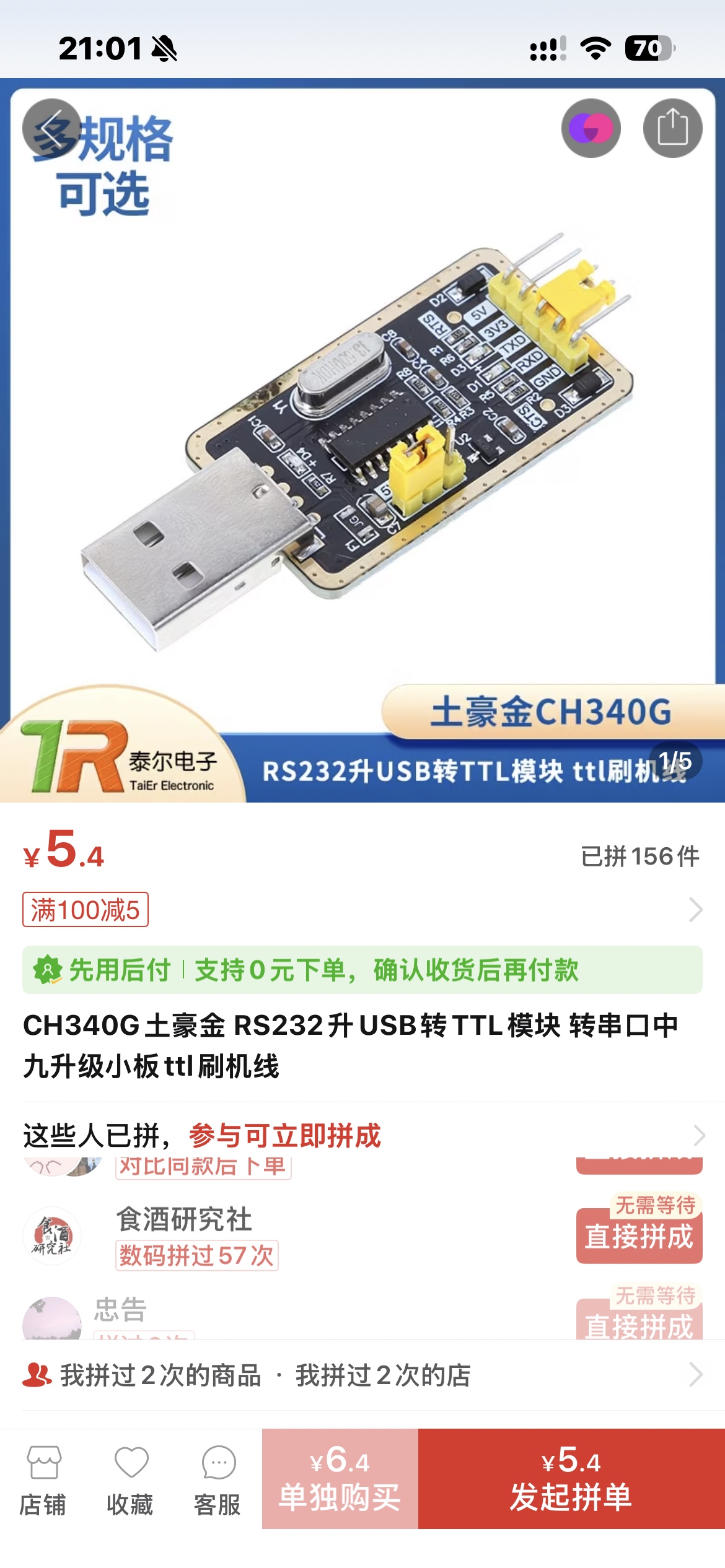
<li><p>CH340G<br> <img src="https://raw.githubusercontent.com/Eagle233Fake/image-hosting/main/14888133e1461ee23526d36553a8eae4.jpg"]]>
    </summary>
    <title>
      <![CDATA[[Homelab] 360 T7 拆机 & 刷入 OpenWrt & 安装 Clash]]>
    </title>
    <updated>2026-08-27T06:36:38.888Z</updated>
  </entry>
  <entry>
    <author>
      <name>Eagle233</name>
    </author>
    <category term="Troubleshooting" scheme="https://blog.eagle233.top/categories/Troubleshooting/"/>
    <id>https://blog.eagle233.top/posts/be6cc9a4/</id>
    <link href="https://blog.eagle233.top/posts/be6cc9a4/"/>
    <published>2026-05-16T10:05:15.000Z</published>
    <summary>
      <![CDATA[<p>最近 macbook 的存储捉襟见肘，更新一个ms365都要命了。我寻思实在没有什么东西是可以清理掉的。。。</p>
<p>直到有一天打开了<code>~/Library/Caches/Homebrew/</code>，发现里面有一堆 Homebrew 拉的一堆💩</p>
<pre class="line-numbers language-bash" data-language="bash"><code class="language-bash">brew cleanup <span class="token parameter variable">--prune</span><spa]]>
    </summary>
    <title>[Troubleshooting] 清理 Homebrew 缓存</title>
    <updated>2026-08-27T06:36:38.889Z</updated>
  </entry>
  <entry>
    <author>
      <name>Eagle233</name>
    </author>
    <category term="Homelab" scheme="https://blog.eagle233.top/categories/Homelab/"/>
    <id>https://blog.eagle233.top/posts/b3b41131/</id>
    <link href="https://blog.eagle233.top/posts/b3b41131/"/>
    <published>2026-04-29T11:15:01.000Z</published>
    <summary>
      <![CDATA[<h2 id="环境"><a href="#环境" class="headerlink" title="环境"></a>环境</h2><ul>
<li>运营商：福建宁德电信</li>
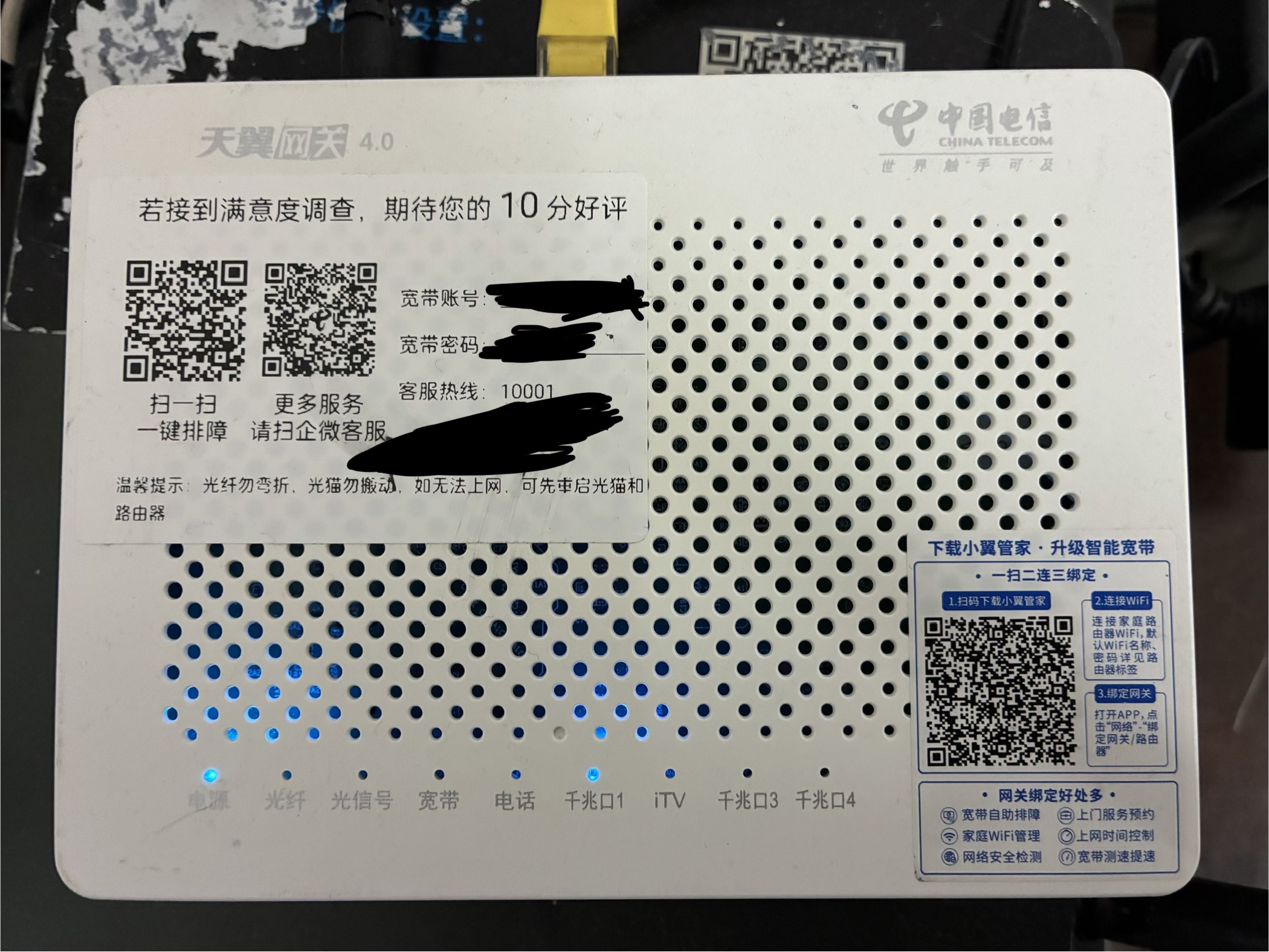
<li>网关：ZXHN F4010C<br>  <img src="https://raw.githubusercontent.com/Eagle233Fake/image-hosting/main/11d0d351df5a59f0bedc3256cac421de.jpg" alt="11d0d351df5a59f0bedc3256cac421de.jpg"><br>  <img src="https://raw]]>
    </summary>
    <title>
      <![CDATA[[Homelab] 天翼网关 4.0 获取超级密码 & 改桥接]]>
    </title>
    <updated>2026-08-27T06:36:38.889Z</updated>
  </entry>
  <entry>
    <author>
      <name>Eagle233</name>
    </author>
    <category term="Troubleshooting" scheme="https://blog.eagle233.top/categories/Troubleshooting/"/>
    <id>https://blog.eagle233.top/posts/f00b751f/</id>
    <link href="https://blog.eagle233.top/posts/f00b751f/"/>
    <published>2026-04-24T02:53:44.000Z</published>
    <summary>
      <![CDATA[<p><a href="https://github.com/Alishahryar1/free-claude-code">https://github.com/Alishahryar1/free-claude-code</a></p>
<p>实测 nvidia 的 api 反应极慢，最终买了 opencode go…</p>
<h2 id="Prerequisites"><a href="#Prerequisites" class="headerlink" title="Prerequisites"></a>Prerequisites</h2><ol>
<li>Get an API key]]>
    </summary>
    <title>[Troubleshooting] Free-Claude-Code</title>
    <updated>2026-08-27T06:36:38.889Z</updated>
  </entry>
  <entry>
    <author>
      <name>Eagle233</name>
    </author>
    <category term="Server" scheme="https://blog.eagle233.top/categories/Server/"/>
    <id>https://blog.eagle233.top/posts/518af507/</id>
    <link href="https://blog.eagle233.top/posts/518af507/"/>
    <published>2026-04-23T08:59:41.000Z</published>
    <summary>
      <![CDATA[<blockquote>
<p>被京东云检测到 <code>clash</code> 进程警告了…</p>
</blockquote>
<h2 id="背景"><a href="#背景" class="headerlink" title="背景"></a>背景</h2><p>实在是有点没办法忍受 Docker 镜像站的限流了，Portainer BE 有自动获取镜像更新状态的功能，用了几次直接干限流了，获取不了状态还会导致 Portainer 卡到爆。今天下午突然觉得还是直接在服务器上部署 Clash 吧。</p>
<h3 id="ssh-config"><a href="#ssh-confi]]>
    </summary>
    <title>[Server] 服务器搭建 Clash [DEPRECATED]</title>
    <updated>2026-08-27T06:36:38.889Z</updated>
  </entry>
  <entry>
    <author>
      <name>Eagle233</name>
    </author>
    <category term="Algorithm" scheme="https://blog.eagle233.top/categories/Algorithm/"/>
    <id>https://blog.eagle233.top/posts/9d7d9b8a/</id>
    <link href="https://blog.eagle233.top/posts/9d7d9b8a/"/>
    <published>2026-04-14T07:21:50.000Z</published>
    <summary>
      <![CDATA[<ul>
<li><a href="https://programmercarl.com/0704.%E4%BA%8C%E5%88%86%E6%9F%A5%E6%89%BE.html#%E7%AE%97%E6%B3%95%E5%85%AC%E5%BC%80%E8%AF%BE">704. 二分查找</a></li>
<li><a href="https://programmercarl.com/0059.%E8%9E%BA%E6%97%8B%E7%9F%A9%E9%98%B5II.html">59. 螺旋矩阵II</a></li>
<li><a href="https://programmerc]]>
    </summary>
    <title>[Algorithm] 算法训练</title>
    <updated>2026-08-27T06:36:38.886Z</updated>
  </entry>
  <entry>
    <author>
      <name>Eagle233</name>
    </author>
    <category term="Interview" scheme="https://blog.eagle233.top/categories/Interview/"/>
    <id>https://blog.eagle233.top/posts/87054007/</id>
    <link href="https://blog.eagle233.top/posts/87054007/"/>
    <published>2026-04-03T05:19:40.000Z</published>
    <summary>
      <![CDATA[<h2 id="面经"><a href="#面经" class="headerlink" title="面经"></a>面经</h2><h3 id="开场"><a href="#开场" class="headerlink" title="开场"></a>开场</h3><p>面试官告诉了我大致的流程：大摩上海的业务基本上就是面向中国的，所以大部分同事也是中国人，但是在周会的时候需要用英语做presentation。所以面试中自我介绍需要用英文，但是后面的问题可以夹杂着中文。我提到对后面技术方面中文更熟悉，面试官同意。</p>
<h3 id="八股"><a href="#八股" class="he]]>
    </summary>
    <title>[Interview] Morgan Stanley 2026 Intern Apprentice Program</title>
    <updated>2026-08-27T06:36:38.889Z</updated>
  </entry>
  <entry>
    <author>
      <name>Eagle233</name>
    </author>
    <category term="总结" scheme="https://blog.eagle233.top/categories/%E6%80%BB%E7%BB%93/"/>
    <id>https://blog.eagle233.top/posts/e7c13eed/</id>
    <link href="https://blog.eagle233.top/posts/e7c13eed/"/>
    <published>2026-03-23T14:08:17.000Z</published>
    <summary>Here's something encrypted, password is required to continue reading.</summary>
    <title>[总结] Review</title>
    <updated>2026-08-27T06:36:38.889Z</updated>
  </entry>
  <entry>
    <author>
      <name>Eagle233</name>
    </author>
    <category term="讲座" scheme="https://blog.eagle233.top/categories/%E8%AE%B2%E5%BA%A7/"/>
    <id>https://blog.eagle233.top/posts/f906ca43/</id>
    <link href="https://blog.eagle233.top/posts/f906ca43/"/>
    <published>2026-03-18T07:23:23.000Z</published>
    <summary>Here's something encrypted, password is required to continue reading.</summary>
    <title>[讲座] 2026年研究生学术沙龙</title>
    <updated>2026-08-27T06:36:38.890Z</updated>
  </entry>
  <entry>
    <author>
      <name>Eagle233</name>
    </author>
    <category term="Server" scheme="https://blog.eagle233.top/categories/Server/"/>
    <id>https://blog.eagle233.top/posts/21cbe2d5/</id>
    <link href="https://blog.eagle233.top/posts/21cbe2d5/"/>
    <published>2026-03-07T13:50:43.000Z</published>
    <summary>
      <![CDATA[<h2 id="Clash-内核端口"><a href="#Clash-内核端口" class="headerlink" title="Clash 内核端口"></a>Clash 内核端口</h2><ul>
<li>混合端口 20660</li>
<li>Socks 端口 49815</li>
<li>Http 端口 14324</li>
</ul>
<h2 id="Users-eagle233-ssh-config-in-macOS"><a href="#Users-eagle233-ssh-config-in-macOS" class="headerlink" title="/Users/]]>
    </summary>
    <title>[Server] 京东云服务器反代</title>
    <updated>2026-08-27T06:36:38.889Z</updated>
  </entry>
  <entry>
    <author>
      <name>Eagle233</name>
    </author>
    <category term="Machine Learning 2021" scheme="https://blog.eagle233.top/categories/Machine-Learning-2021/"/>
    <id>https://blog.eagle233.top/posts/51951d49/</id>
    <link href="https://blog.eagle233.top/posts/51951d49/"/>
    <published>2025-10-23T16:12:26.000Z</published>
    <summary>
      <![CDATA[<h1 id="回归（Regression）"><a href="#回归（Regression）" class="headerlink" title="回归（Regression）"></a>回归（Regression）</h1><h2 id="机器学习：寻找函数"><a href="#机器学习：寻找函数" class="headerlink" title="机器学习：寻找函数"></a>机器学习：寻找函数</h2><p>机器学习可以概括为“寻找函数” ($f$)：</p>
<ul>
<li><strong>语音识别</strong>：输入声音，输出文本（如 $f(\text{声音}) &#x]]>
    </summary>
    <title>[Machine Learning 2021] 回归（Regression）</title>
    <updated>2026-08-27T06:36:38.889Z</updated>
  </entry>
  <entry>
    <author>
      <name>Eagle233</name>
    </author>
    <category term="Troubleshooting" scheme="https://blog.eagle233.top/categories/Troubleshooting/"/>
    <id>https://blog.eagle233.top/posts/468db02a/</id>
    <link href="https://blog.eagle233.top/posts/468db02a/"/>
    <published>2025-10-12T15:41:48.000Z</published>
    <summary>
      <![CDATA[<pre class="line-numbers language-bash" data-language="bash"><code class="language-bash"><span class="token comment"># 启动 agent（如果未启动）</span>
Start-Service ssh-agent

<span class="token comment"># 设置开机自动启动</span>
Set-Service <span class="token parameter variable">-Name</span> ssh-agent <span class="]]>
    </summary>
    <title>[Troubleshooting] Windows 上配置 ssh-agent 实现 Git 和 ssh 免密码</title>
    <updated>2026-08-27T06:36:38.889Z</updated>
  </entry>
  <entry>
    <author>
      <name>Eagle233</name>
    </author>
    <category term="Troubleshooting" scheme="https://blog.eagle233.top/categories/Troubleshooting/"/>
    <id>https://blog.eagle233.top/posts/305bb64b/</id>
    <link href="https://blog.eagle233.top/posts/305bb64b/"/>
    <published>2025-10-12T14:58:53.000Z</published>
    <summary>
      <![CDATA[<ol>
<li>设置自动 commit 时间戳 alias</li>
</ol>
<pre class="line-numbers language-bash" data-language="bash"><code class="language-bash"><span class="token function">git</span> config <span class="token parameter variable">--global</span> alias.cmt <span class="token string">'!git add -A &amp;&amp; git co]]>
    </summary>
    <title>[Troubleshooting] Git alias 记录</title>
    <updated>2026-08-27T06:36:38.889Z</updated>
  </entry>
  <entry>
    <author>
      <name>Eagle233</name>
    </author>
    <category term="Troubleshooting" scheme="https://blog.eagle233.top/categories/Troubleshooting/"/>
    <id>https://blog.eagle233.top/posts/7434a3ae/</id>
    <link href="https://blog.eagle233.top/posts/7434a3ae/"/>
    <published>2025-09-29T08:27:41.000Z</published>
    <summary>
      <![CDATA[<h2 id="目标"><a href="#目标" class="headerlink" title="目标"></a>目标</h2><ul>
<li>WSL2 内 SSH 服务监听端口 22</li>
<li>Windows 本地端口 1145 转发到 WSL2 的 22</li>
<li>公网访问 Windows 公网 IP 的 1145 端口即可 SSH 登录 WSL2</li>
<li>公网访问 eagle233.top:1145 即可 SSH 登录 WSL2</li>
</ul>
<hr>
<h2 id="确保-WSL2-内-SSH-服务正常"><a href="#确保-WSL2-内]]>
    </summary>
    <title>[Troubleshooting] 将 WSL2 的 SSH 端口映射到公网</title>
    <updated>2026-08-27T06:36:38.889Z</updated>
  </entry>
  <entry>
    <author>
      <name>Eagle233</name>
    </author>
    <category term="Troubleshooting" scheme="https://blog.eagle233.top/categories/Troubleshooting/"/>
    <id>https://blog.eagle233.top/posts/5c5cf9d1/</id>
    <link href="https://blog.eagle233.top/posts/5c5cf9d1/"/>
    <published>2025-08-13T13:32:34.000Z</published>
    <summary>
      <![CDATA[<p>网上一大堆花里胡哨的方式，其实只要在 Clash 中打开 <strong>TUN模式</strong> 就可以了…</p>
<hr>]]>
    </summary>
    <title>[Troubleshooting] 在 WSL2 中实现代理</title>
    <updated>2026-08-27T06:36:38.889Z</updated>
  </entry>
  <entry>
    <author>
      <name>Eagle233</name>
    </author>
    <category term="Troubleshooting" scheme="https://blog.eagle233.top/categories/Troubleshooting/"/>
    <id>https://blog.eagle233.top/posts/809ccd3f/</id>
    <link href="https://blog.eagle233.top/posts/809ccd3f/"/>
    <published>2025-08-13T12:43:37.000Z</published>
    <summary>
      <![CDATA[<p>CS50x 提供的<a href="https://cs50.dev/">在线VS Code</a>其实无需配环境即可使用。为了熟悉命令的使用，我选择在本地部署环境。但是，直接在 Windows 下安装<code>submit50</code> <code>style50</code> <code>check50</code>等工具会报错如下：</p>
<pre class="line-numbers language-bash" data-language="bash"><code class="language-bash">Traceback <span class="token p]]>
    </summary>
    <title>[Troubleshooting] 在本地配置 CS50x 环境</title>
    <updated>2026-08-27T06:36:38.889Z</updated>
  </entry>
</feed>